SmartyPOS Demo

Talk to your restaurant. In chat or by voice.

A private MCP server on top of your Syrve. Claude or ChatGPT read your sales, menu, staff, stock and event log, answer in plain words, and, if you allow it, prepare changes that you approve with one tap.

Live

Updated 2026-11-28

40 tools
Sales, menu, staff, stock, suppliers, event log, settings, orders.
Preview first
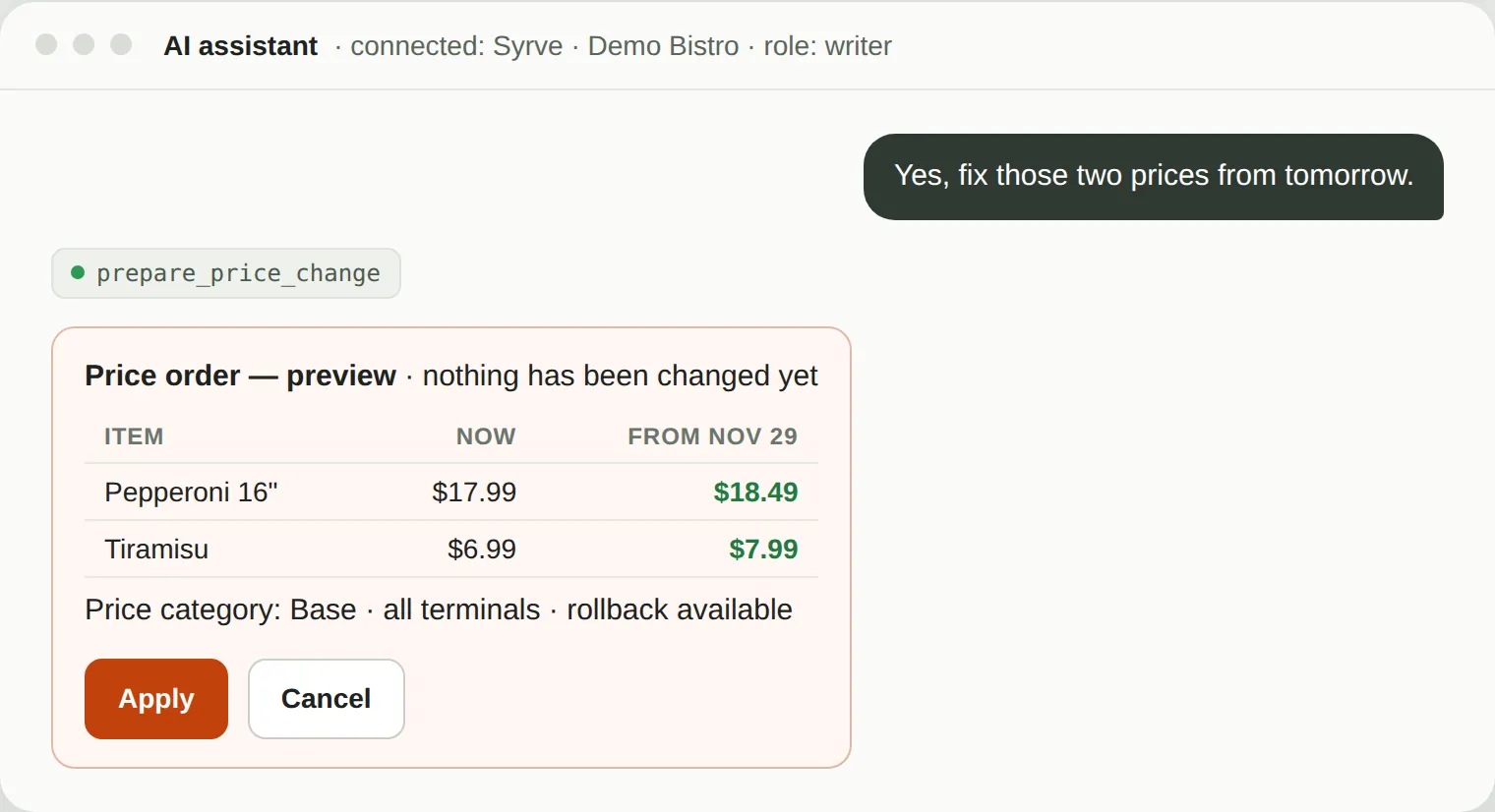
Every change shows “now → after” and waits for your yes.
Rollback
Each applied change can be undone; every call is in the audit log.
Chat + voice
Claude and ChatGPT on desktop and phone; Claude voice mode.

See it

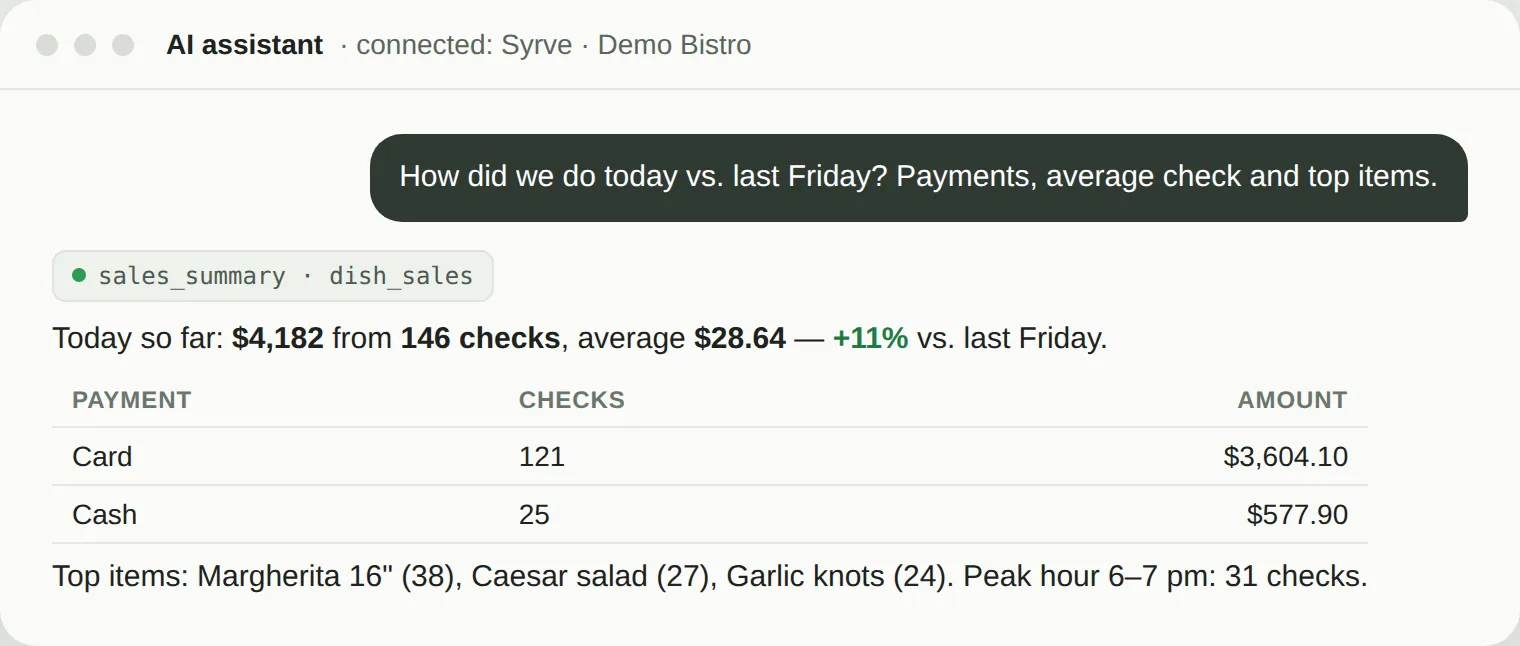
Chat answer with today's sales, payments and top items
Sales today vs. last week, payments, top items
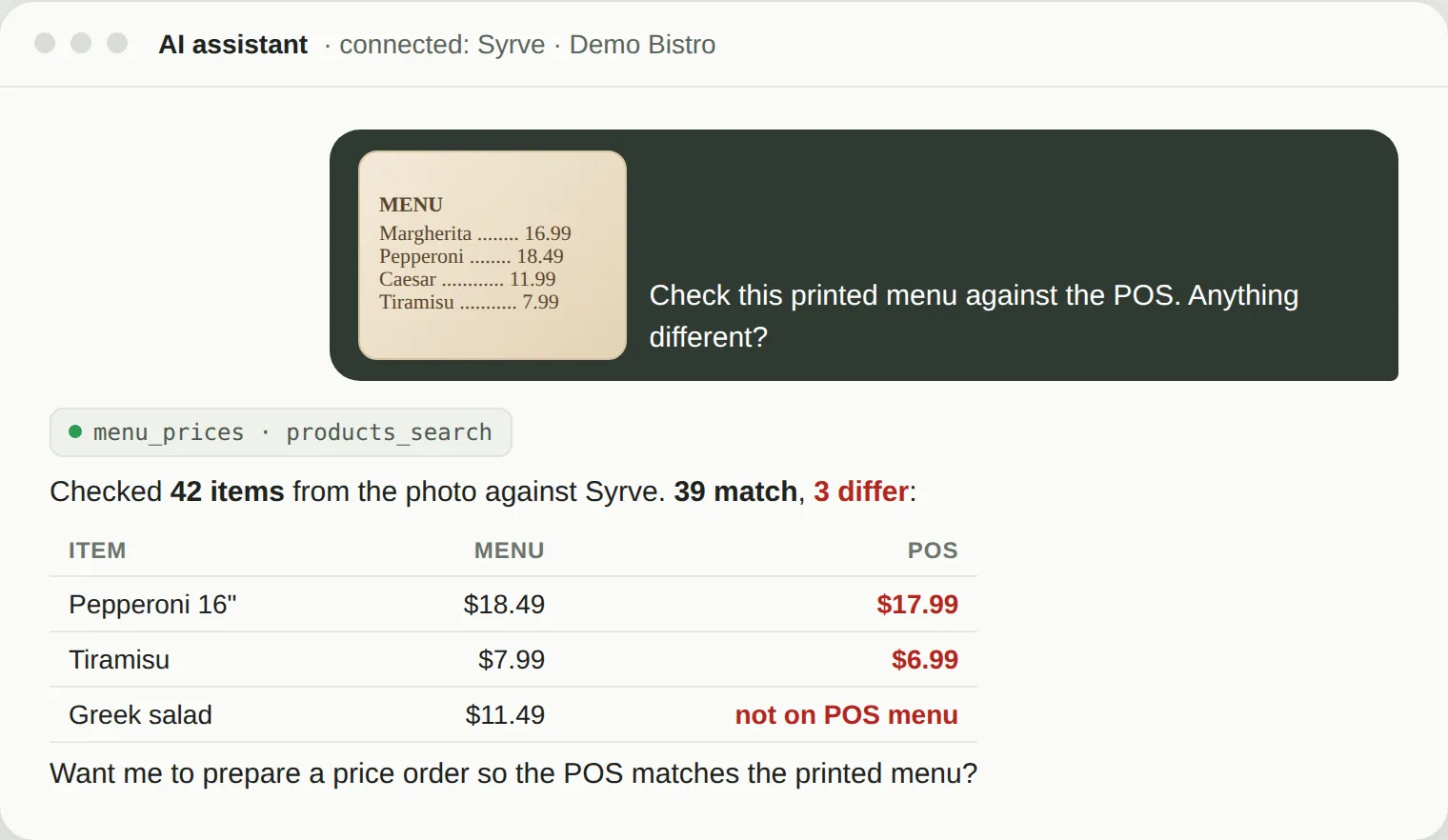
Chat comparing a photo of a printed menu with POS prices
Photo of the printed menu checked against the POS
Price change preview with Apply and Cancel buttons
A price order prepared for approval
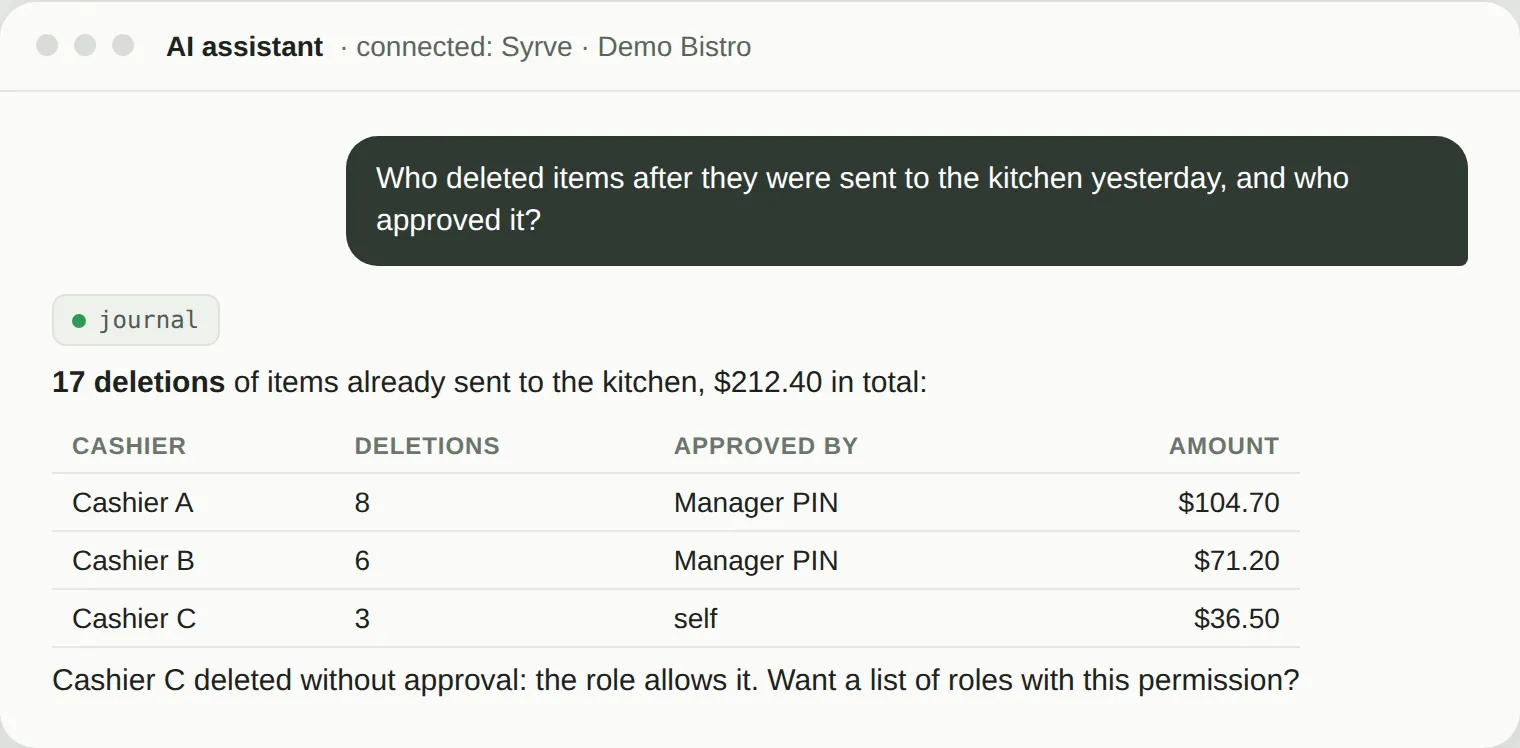
Deletions after kitchen send, by cashier and approver
Who deleted what, and who approved it
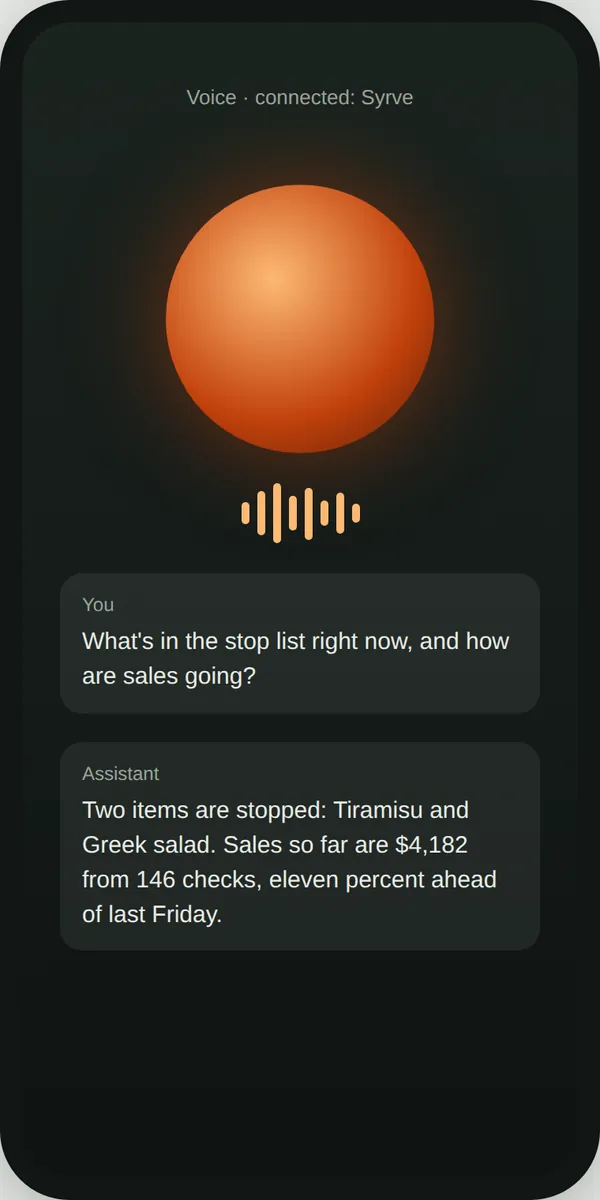
Voice conversation on a phone about stop list and sales
Voice, hands-free

Demo restaurant and demo numbers. Your assistant app looks like itself; the answers come from your Syrve.

Two editions

Analytics

Read-only: ask anything about your restaurant

  • Sales, checks, payments, average check, by hour, day, location
  • Item sales, food cost and margin, recipes and tech cards
  • Voids, deletions, discounts, “on the house” orders, open checks
  • Staff hours, late clock-ins, forgotten clock-outs, labor cost, cash shifts
  • Stock, inventory counts, supplier invoices and price changes
  • Event log and settings: who changed what, when

Operator

Read + changes you approve

  • Everything in Analytics
  • Price orders: raise or align prices, delivery-app price category, lunch prices on a schedule
  • Write-off and transfer drafts for the manager to post
  • Item card fixes: tax category, units, names
  • Other back-office actions through the Syrve API, with the same preview
  • Rollback of any applied change

Two ways to use it

Chat

Claude or ChatGPT, desktop and phone

  • Tables, comparisons and charts in the answer
  • Send a photo or a file: a printed menu, a supplier invoice, a schedule
  • Long tasks: audits, month reviews, reconciliations

Voice

Hands-free in the Claude app

  • Ask on the way to the restaurant: “How are sales going?”
  • Quick checks during service: stop list, open checks, who is on shift
  • Voice runs on Claude Haiku, Sonnet or Opus; Claude asks before using a tool
  • Changes still go through preview and your explicit yes

Typical cases

Menu

Here is a photo of our printed menu. Does the POS match?

Every name and price compared; differences listed; a price order prepared to fix them.

Menu

Which items have no price or no tax set?

Finds items that would ring up at zero or without sales tax before guests notice.

Sales

Give me the day: payments, checks, average, by hour, top items.

A closing summary in seconds, compared with the same day last week.

Locations

Revenue for every location yesterday.

One table across all your restaurants with one sign-in.

Control

Who deleted items after the kitchen got them, and who approved?

Deletions by cashier, approver and amount, straight from the event log.

Control

Which orders were closed without payment today?

“On the house” and open checks by cashier, with the PIN that approved them.

Settings

Check our printer routing: which station prints where?

Reads the configuration history and shows what changed, when and by which user.

Settings

Who has system administrator rights?

Roles and permissions per employee, with risky ones flagged.

Staff

Who forgot to clock out this week, and whose shift is over 12 hours?

Broken punches found; a correction prepared for approval.

Suppliers

Which supplier prices went up this month?

Invoice lines compared with the previous price, biggest increases first.

Prices

Set delivery-app prices 25% above base.

A price order for the delivery price category, previewed before it applies.

Investigation

Why are yesterday's invoices gone?

The event log shows which user ran which action, at what time.

What it covers

Sales and checks

  • Summary with comparison to a previous period
  • Item sales with cost and food cost
  • Flexible OLAP reports
  • Delivery and website orders, stop list

Menu and prices

  • Prices by price category
  • Item and modifier search
  • Price orders with schedules
  • Syrve dictionaries: order types, payment types, discounts

Staff and cash

  • Attendance and schedule
  • Labor cost and payroll hours
  • Cash shifts and pay-ins
  • Staff data only for roles you allow

Stock and suppliers

  • Stock balance by store
  • Inventory counts
  • Supplier invoices by product
  • Write-off and transfer drafts

Control and settings

  • Full event log: deletions, voids, logins, settings
  • Printer and station configuration history
  • Roles and permissions

Optional

Connected data

  • Loyalty balance by phone
  • Phone call transcripts and stats
  • Online and catering orders, CRM, guest surveys

Safe by design

  1. Prepare

    The assistant shows “now → after”. Nothing is written yet.

  2. Approve

    You say yes. The change applies only for the same user, within 10 minutes.

  3. Re-check

    Data is re-read before writing; a rate limit caps changes per hour.

  4. Undo

    Rollback reverses a price order or removes a draft.

Access

  • Google sign-in
  • Roles: reader, writer, staff data
  • Removing a user ends their sessions at once

Privacy

  • Each restaurant runs its own isolated server
  • Guest phones, emails and cards hidden by default
  • Your Syrve password never reaches the AI

Audit

  • Every call and every refusal is logged
  • Who asked, what changed, the Syrve response
  • No posting documents or back-dated edits by design

Works with

Claude

  • Web, desktop and mobile apps as a custom connector. Voice mode can use connectors.

ChatGPT

  • Plans with developer mode and MCP apps; write actions follow OpenAI's confirmation rules.

Standard

Any MCP client

  • Standard remote MCP with OAuth 2.1.

Plans

Per location per month. No contract. Discount for annual payment.

Analytics

Read-only: ask anything about your restaurant.

Get prices MCP Server Analytics

Operator

Read + changes you approve, with rollback.

Get prices MCP Server Operator
  • Discount for each additional location.
  • First 30 days free.
  • Each user needs their own Claude or ChatGPT plan (not included).

Bundle: Web Ordering Pro + MCP Server Operator + Call Analytics Pro together, at a discount.

Get prices Bundle (Web Ordering + MCP Server + Call Analytics)

Get prices

* required

Get it for your restaurant

Pricing depends on the edition and the number of locations. Tell us about your restaurant and we will send an offer.

Contact us

Requires Syrve and a Claude or ChatGPT plan for each user.

Sources

See it on your menu, your orders, your numbers.

A 45-minute call. We open Syrve with your concept in mind, show what is live today, and tell you straight whether it fits.